
Applications
Unit offers a short, low-friction, non-documentary application process - most applications will be approved in under five seconds. In some cases Unit detects an exception in the application process (e.g. a phone number mismatch), and certain documents are required in order to make a decision.
Unit will let you know exactly what documents to require from the customer, and once they are provided (via an API call), the application will either be approved automatically or manually reviewed by us (under an SLA of two business hours).
For more information on applications including specific details about application statuses and flow, see our End-Customer Applications Guide
Some variations to the Applications API may occur, depending on your bank partner. Please reach out to the Unit team to align on the full set of requirements that apply to your onboarding process.
Application Statuses
The final statuses for an application are Approved, Denied or Canceled. Once an application is approved, a Customer resource will be created and associated with the application resource.
The new created customer resources will be referenced in the relationships object.
In most cases, an application will reach one of these final statuses immediately after creation, without requiring any documents.
In some cases, documents will be required and the application will enter an AwaitingDocuments status. Once you upload all the required documents, Unit will use the information provided to approve or deny the application. The decision may take seconds in some cases and up to two hours in other cases (when a manual review is required). Once the process is complete, you will receive a webhook containing the result.
An application can also be evaluated asynchronously, in which case its status will be Pending as long as the evaluation process is running. Once the process is complete, the status will change to either Approved, Denied or AwaitingDocuments and the relevant webhook event will be fired (see Pending status description below)
There is an option to Cancel Application at any point that is not Pending, Approved or Denied. The status of the application will change to Canceled, and the relevant webhook event will be fired.
Below is a diagram describing the lifecycle of an application:
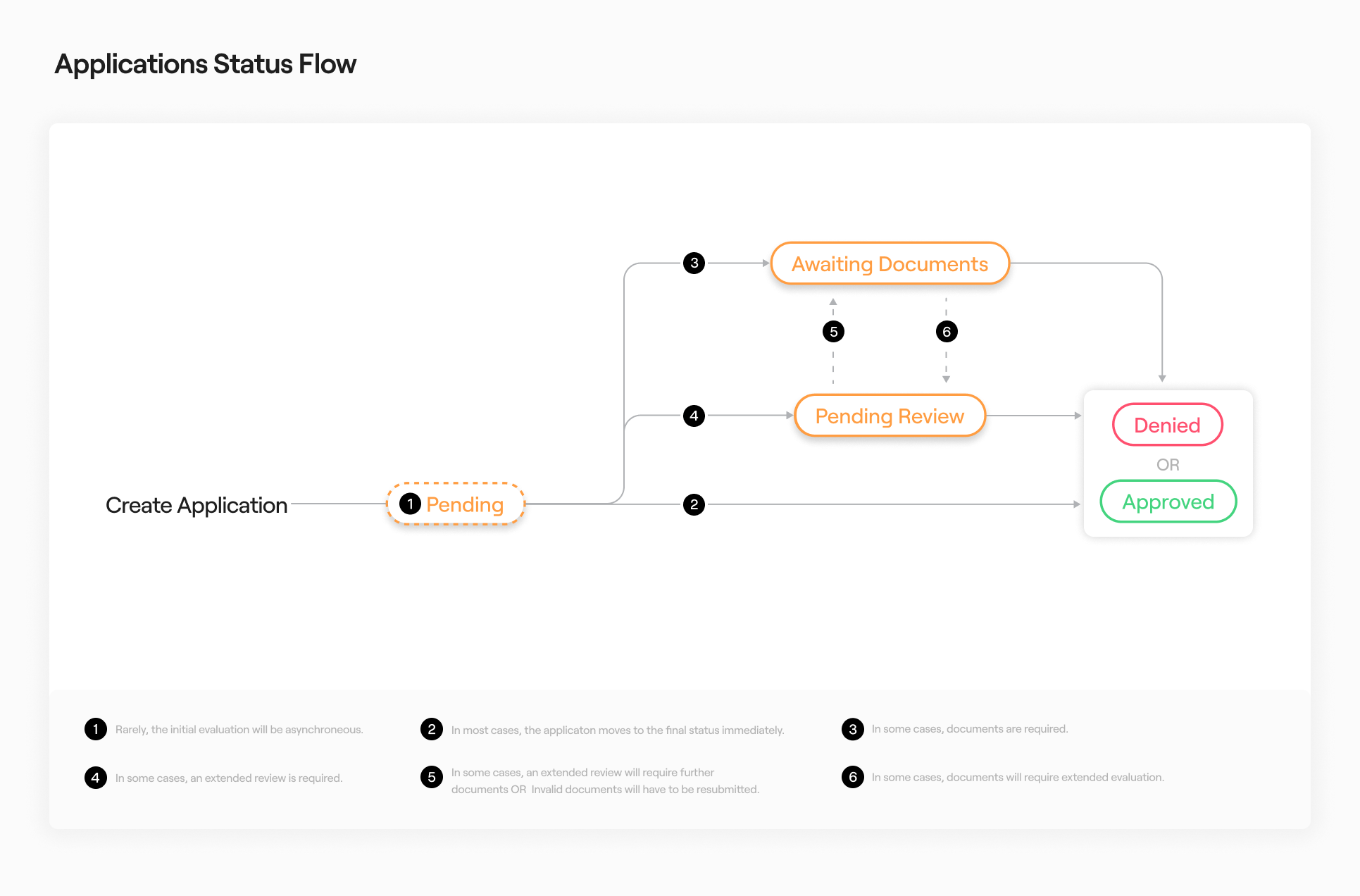
Below are all application statuses and their descriptions:
| Status | Description |
|---|---|
AwaitingDocuments | Certain documents are required for the process to continue. You may upload them via Upload Document. |
PendingReview | The application is pending review by Unit (with an SLA of 2 business hours). |
Pending | The application is being evaluated asynchronously and a result should be available shortly. Listen for webhooks (application.denied, customer.created) and application.awaitingdocuments) for the final result, or periodically query the application with Get by Id). |
Approved | The application was approved. A Customer resource was created. |
Denied | The application was denied. A Customer resource will not be created. |
Canceled | The application was сanceled. A Customer resource will not be created. |
Device Fingerprints
A Device fingerprint is a way to combine certain attributes of a device (operating system, IP address, device language settings etc.) in order to identify unique devices.
Unit partners with select providers to detect and prevent potential fraud. To enjoy improved protection, you must add the device fingerprint to new application.
Please see our technical documents for the requirements to implement Device Fingerprints. There are additional steps to enable device verifications.